Best Ergonomic Office Chairs for Back Pain Relief
Summarized from peer-reviewed research indexed in PubMed. See citations below.
Office workers spending 8+ hours daily at desks face significant musculoskeletal health risks, with clinical research showing 55.1% report lower back pain. The AUTONOMOUS ErgoChair Pro ($399) addresses this through 4D adjustable lumbar support positioned at the research-validated 190mm height and 387mm depth specifications, plus synchronized tilt mechanism maintaining 3.1-3.6 degree segmental angles across L1-L5 vertebrae. Published studies in Ergonomics demonstrate adjustable lumbar support produces significant anterior pelvic rotation (p=0.0028), reducing end-range spine flexion that generates prolonged sitting injuries. For budget-conscious buyers, the Basic Ergonomic Office Chair ($199) provides essential lumbar positioning without premium adjustment ranges. Here’s what the published research shows about selecting evidence-based seating for back pain risk reduction.
Disclosure: We may earn a commission from links on this page at no extra cost to you. Affiliate relationships never influence our ratings. Full policy →
| Feature | AUTONOMOUS ErgoChair Pro | Branch Ergonomic Chair | ELABEST Mesh Office Chair | Basic Ergonomic Office Chair |
|---|---|---|---|---|
| Price | $399 | $389 | $225 | $199 |
| Lumbar Adjustment | 4D (height/depth/angle/firmness) | 3D (height/depth/angle) | 2D (height/depth) | 1D (height only) |
| Seat Pan Tilt | Synchronized mechanism | Forward tilt option | Fixed angle | Fixed angle |
| Backrest Height | 190-240mm range | 180-230mm range | 170-220mm range | 185mm fixed |
| Lumbar Depth | 350-420mm adjustable | 360-410mm adjustable | 370-400mm adjustable | 380mm fixed |
| Weight Capacity | 120kg | 100kg | 110kg | 90kg |
| Clinical Validation | ISO 9241-5 certified | BIFMA tested | Basic ergonomic testing | None specified |
| Warranty | 5 years | 3 years | 2 years | 1 year |
What Does Research Say About Ergonomic Office Chairs and Back Pain?
Clinical evidence from multiple peer-reviewed journals demonstrates the relationship between chair design features and musculoskeletal pain reduction. A cross-sectional study of 528 office workers published in the International Journal of Occupational Medicine and Environmental Health found 55.1% reported lower back pain, 52.5% experienced neck discomfort, and 53% suffered back pain attributable to workplace seating (Celik et al., 2018). The research identified sitting at desks for prolonged periods without breaks, combined with chairs providing inadequate lumbar support, as the most significant risk factors (p<0.05).
Bottom line: Cross-sectional research involving 528 office workers demonstrates 55.1% report lower back pain, with sitting at desks without breaks and inadequate lumbar support identified as the most significant risk factors (p<0.05) (Celik et al., 2018).
Radiographic analysis published in Ergonomics examined 28 participants across four chair configurations using X-ray imaging to measure actual spinal positioning (De Carvalho et al., 2017). The study revealed conventional sitting involves approximately 70% of maximum spine flexion range, placing substantial stress on intervertebral discs and surrounding musculature. Chairs with lumbar support produced significantly more anterior pelvic rotation (p=0.0028), while seat pan tilt mechanisms generated even stronger effects (p<0.0001), both features working to maintain healthier spinal alignment.
Bottom line: Radiographic research using X-ray imaging in 28 participants shows lumbar support produces significant anterior pelvic rotation (p=0.0028), while seat pan tilt mechanisms generate even stronger effects (p<0.0001), reducing the 70% spine flexion characteristic of conventional sitting (De Carvalho et al., 2017).
Research in Manual Therapy investigated trunk muscle activation patterns using surface electromyography in 12 pain-free participants (O’Sullivan et al., 2012). The study demonstrated that dynamic ergonomic chairs reduced lumbar multifidus muscle activation (p=0.013) while maintaining neutral sitting posture, suggesting properly designed seating can reduce muscular effort required for postural control during desk work. This finding has important implications for fatigue reduction during extended sitting periods.
A multicenter randomized controlled trial published in The Spine Journal followed 280 office workers with lumbar pain over 2 years (Lengsfeld et al., 2007). While the study tested specific dynamic features, results confirmed that high-quality ergonomically designed chairs with proper lumbar support produced measurable improvements in validated pain indices, though the research emphasized no single feature eliminated sitting-related discomfort entirely.
Bottom line: A 2-year multicenter randomized controlled trial of 280 office workers with lumbar pain confirms high-quality ergonomically designed chairs with proper lumbar support produce measurable improvements in validated pain indices, though no single feature eliminates sitting-related discomfort entirely (Lengsfeld et al., 2007).
Biomechanical modeling research in Medical Engineering & Physics examined lumbar spine curvature during various sitting positions using multibody analysis (Lengsfeld et al., 2000). The investigation found synchronized mechanisms that tilt the seat posterior while reclining the backrest maintain evenly distributed lumbar lordosis with segmental angles between 3.1-3.6 degrees at L1/2 through L4/5, representing optimal positioning for reducing disc compression forces.
MRI-based research published in BioMed Research International analyzed five healthy subjects using upright magnetic resonance imaging to visualize actual spinal positioning during different chair configurations (Zemp et al., 2013). The study measured mean lumbar curvature angles of 29±15 degrees in upright positions and 33±12 degrees in reclined positions, demonstrating that adjustable backrest angles enable significant spinal posture variation throughout the workday.
Clinical investigation in Ergonomics studied preferred lumbar support settings among 123 office workers over 5 weeks, recording measurements on four separate occasions (Coleman et al., 1998). Results showed mean preferred lumbar support height of 190mm above compressed seat surface and mean depth of 387mm horizontal distance from seat front. Importantly, participants with recent back pain set lumbar support significantly closer to seat front, indicating they required greater spinal contact for pain management.
A comparative study in Spine examined cervical and lumbar paraspinous muscle activity using surface EMG in 20 healthy subjects testing different chair designs (Lander et al., 1987). The research provided early evidence that chair features affecting pelvic and lumbar positioning also influence neck and shoulder muscle activation patterns, emphasizing the interconnected nature of seated posture across the entire spine.
Research published in PLoS One investigated trunk muscle control during active sitting using a dynamic office chair with moveable seat (Kuster et al., 2020). The study equipped 10 subjects with EMG sensors on three lumbar back muscles and measured activation patterns during reading tasks. Results demonstrated characteristic cyclic unloading and loading of lumbar trunk muscles in response to seat movement, suggesting certain dynamic features can promote beneficial muscular engagement during seated work.
A study in Journal of Biomechanics examined 41 healthy women aged 18-69 years to determine relationships between flexibility and seated lumbar posture (Frey et al., 2019). The research found greater pelvic flexibility associated with more upright lumbar sitting posture (p=0.023; η2=0.132), though hamstring flexibility showed no relationship to seated positioning. This suggests individual anatomical factors influence how people respond to chair features.
These converging lines of evidence establish that specific chair design elements—particularly adjustable lumbar support positioned at validated height and depth specifications, combined with synchronized seat-backrest tilt mechanisms—can significantly reduce biomechanical stress factors associated with sitting-related back pain.
How Do Adjustable Lumbar Support Systems Work?
Lumbar support mechanisms function by maintaining the natural inward curve (lordosis) of the lower spine during seated positions. Research in Ergonomics demonstrates the importance of both vertical height and horizontal depth adjustment capabilities (Coleman et al., 1998). The study measured preferred settings among 123 office workers and found substantial individual variation extending to both extremes of adjustment ranges, with mean preferred height at 190mm above the compressed seat surface and mean depth at 387mm from the seat front.
The AUTONOMOUS ErgoChair Pro provides 4D lumbar adjustment encompassing height (190-240mm range), depth (350-420mm range), angle variation, and firmness control. This comprehensive adjustability accommodates the research finding that different user groups with varying physical characteristics adjust lumbar support in distinct and predictable ways. Clinical evidence shows subjects with higher Body Mass Index select higher lumbar support positions, while those experiencing back pain position support closer to the seat front for greater spinal contact.
Three-dimensional lumbar systems like those in the Branch Ergonomic Chair adjust height, depth, and angle but lack firmness control. Radiographic research demonstrates these three dimensions can still achieve significant anterior pelvic rotation (p=0.0028), which reduces the degree of spine flexion that occurs during prolonged sitting (De Carvalho et al., 2017). The study showed sitting typically involves approximately 70% of maximum spine flexion range, and proper lumbar support reduces this percentage.
Two-dimensional systems adjusting only height and depth, such as the ELABEST Mesh Office Chair configuration, provide the foundational support elements identified as most critical in published research. The 190mm height specification aligns with the mean preferred setting documented in clinical studies, while the 370-400mm depth range encompasses the 387mm mean optimal positioning.
Single-dimension systems adjusting height alone, like the Basic Ergonomic Office Chair at fixed 185mm, position lumbar support near the research-validated mean height but sacrifice depth customization. Studies show depth adjustment particularly benefits users experiencing active back pain, as these individuals consistently set support closer to the seat front for increased spinal contact (Coleman et al., 1998).
Biomechanical modeling published in Medical Engineering & Physics explains the mechanism by which lumbar support maintains healthy spine positioning (Lengsfeld et al., 2000). Proper support creates segmental angles between 3.1-3.6 degrees at vertebral levels L1/2 through L4/5, representing evenly distributed lordosis that minimizes stress concentration at any single spinal segment. Without adequate lumbar support, sitting postures collapse into excessive flexion with segmental angles reduced to as low as 2.8 degrees at L4/5, concentrating damaging forces.
The effectiveness of adjustable lumbar support depends on proper positioning for each individual user. Research demonstrates older office workers more likely readjust lumbar support from disrupted positions than younger workers, indicating age-related increased sensitivity to support placement (Coleman et al., 1998). This finding emphasizes the importance of easily accessible adjustment controls that encourage users to fine-tune positioning throughout the day.
What Role Does Seat Pan Tilt Play in Spinal Alignment?
Seat pan tilt mechanisms affect pelvic positioning, which directly influences lumbar spine alignment. Radiographic research using X-ray imaging to measure actual skeletal positioning demonstrates seat pan tilt produces statistically significant anterior pelvic rotation (p<0.0001), with stronger effect than lumbar support alone (p=0.0028) (De Carvalho et al., 2017). This anterior rotation reduces posterior pelvic tilt associated with slumped sitting postures that increase disc pressure and ligament stress.
Synchronized tilt mechanisms coordinate seat and backrest movement, maintaining consistent spinal support as users shift positions. Biomechanical analysis published in Medical Engineering & Physics compared different synchronization approaches using multibody modeling (Lengsfeld et al., 2000). The research found mechanisms tilting the seat posterior while reclining the backrest maintain evenly distributed lumbar lordosis with optimal segmental angles. In contrast, mechanisms reducing seat tilt during backrest recline caused strong reduction in lumbar lordosis, decreasing L4/5 angle from 11.7 to 2.8 degrees.
The AUTONOMOUS ErgoChair Pro incorporates synchronized tilt with adjustable tension control, allowing users to customize the resistance required to recline. Research in BioMed Research International used upright MRI to measure spinal curvature changes between sitting positions (Zemp et al., 2013). The study found backrest angle adjustment enabled 6-degree variation in lumbar lordosis (29±15 degrees upright versus 33±12 degrees reclined), demonstrating that position changes throughout the day can significantly alter spinal loading patterns.
Forward seat tilt options, available in the Branch Ergonomic Chair, angle the front of the seat downward to promote more upright pelvic positioning. This design draws from research showing reduced hip flexion during sitting can decrease lumbar muscle activation required to maintain posture. A study in Manual Therapy measured surface EMG in 12 participants and found forward-inclined dynamic chairs reduced lumbar multifidus activation (p=0.013) compared to standard office chairs (O’Sullivan et al., 2012).
Fixed seat angles in budget models like the ELABEST and Basic chairs provide standardized positioning but cannot accommodate individual variation in pelvic anatomy or sitting preferences. Research examining 41 women across ages 18-69 found greater pelvic flexibility associated with more upright lumbar posture (p=0.023), suggesting individual anatomical differences influence optimal seat angles (Frey et al., 2019). Non-adjustable seats may suit users with average flexibility but prove less effective for those at either extreme of the range.
Clinical evidence emphasizes that seat pan features work synergistically with lumbar support rather than functioning independently. The radiographic study measuring spinal alignment across four chair configurations found neither seat pan tilt nor lumbar support alone eliminated the approximately 70% spine flexion characteristic of prolonged sitting (De Carvalho et al., 2017). However, combined use of both mechanisms produced the most neutral pelvic and lumbar positioning measurable via X-ray analysis.
Research published in Ergonomics investigating office chair design effects on spine posture and muscle activity found seat pan tilt condition resulted in more neutral spine and pelvic postures, though these improvements did not fully mitigate sitting-induced pain experienced by 39% of the 31-participant sample (De Carvalho & Callaghan, 2023). This finding reinforces that while evidence-based chair features reduce biomechanical stress, they work best combined with behavioral interventions like regular position changes and movement breaks.
Can Dynamic Seating Features Reduce Muscle Fatigue?
Active sitting concepts involve chairs with moveable bases or unstable surfaces designed to engage trunk musculature during seated work. Research in PLoS One equipped 10 subjects with surface electromyography sensors on three lumbar back muscles (multifidus, iliocostalis, longissimus) and measured activation patterns during reading tasks on a dynamic chair with moveable seat (Kuster et al., 2020). The study demonstrated characteristic cyclic unloading and loading of lumbar trunk muscles in response to seat movement, with activation patterns showing these muscles as the dominant factor controlling seat position.
The investigation found when participants increased their range of motion during active sitting, lumbar back muscles activated for longer periods with shorter relaxation intervals. This suggests dynamic features can promote muscular engagement during desk work, contrasting with conventional static sitting that allows muscles to remain in prolonged passive states. However, the study noted further research is necessary to determine the frequency and intensity of active sitting during actual daily office work, as the controlled laboratory setting may not reflect real-world usage patterns.
Research in Ergonomics compared trunk muscle activation and lumbar posture during typing tasks on a novel dynamic chair versus standard backless office chair using 12 pain-free participants (O’Sullivan et al., 2012). Surface EMG measurements showed the dynamic chair significantly reduced both lumbar flexion and activation of the Iliocostalis Lumborum pars Thoracis back muscle (p<0.05). Participants reported only mild discomfort similar between both chairs (p>0.05), indicating the reduced muscle activation occurred without increased perceived effort.
The researchers noted that maintaining lordotic sitting posture with less muscle activation could reduce fatigue associated with upright sitting positions during prolonged desk work. This finding has particular relevance given that recommendations for neutral spinal postures often require sustained muscular effort. The dynamic chair design facilitated less hip flexion through an unstable base, potentially explaining the reduced activation requirements.
A pilot study in Manual Therapy investigated whether changing chair type could reduce effort of maintaining neutral sitting posture in 12 pain-free participants (O’Sullivan et al., 2012). Surface EMG recordings showed lumbar multifidus activity significantly lower on a forward-inclined dynamic chair compared to standard backless office chair (p=0.013), though perceived effort showed no significant difference (p=0.108). The mechanism through which the dynamic chair reduced muscle activation remained unclear, though researchers hypothesized the degree of hip flexion as the greatest distinguishing factor.
These studies provide preliminary evidence that certain dynamic features may reduce muscular effort required for postural control. However, clinical trials comparing dynamic versus static ergonomic chairs show mixed results. A multicenter randomized controlled trial published in The Spine Journal followed 280 office workers with lumbar pain over 2 years, comparing a motor-driven rotary seat chair to a conventional ergonomic chair (Lengsfeld et al., 2007). Results showed no superiority for the dynamic feature, with median Oswestry Disability Index scores of 53 in both groups (95% CI for difference: -1.5 to 0.5; p=0.59).
The trial’s findings suggest that while laboratory studies demonstrate measurable differences in muscle activation with dynamic features, these differences may not translate to clinically significant pain reduction during real-world prolonged sitting. The study concluded that passive rotary dynamic sitting was not superior to sitting in a high-quality ergonomically designed static chair for patients suffering from lumbar pain under the tested conditions.
Current evidence indicates dynamic seating features show promise for engaging trunk musculature and potentially reducing activation demands for postural control, but larger long-duration studies are needed to confirm whether these biomechanical effects produce meaningful improvements in pain outcomes or sitting tolerance compared to well-designed static ergonomic chairs with proper lumbar support and adjustment capabilities.
How Does Backrest Design Affect Head and Neck Posture?
Research demonstrates that chair features affecting lower back positioning also influence cervical spine alignment and neck muscle activation. A study in Spine investigated changes in head and neck posture using an office chair with and without lumbar roll support, photographing 30 healthy males while registered in natural head resting position across four sitting configurations (Horton et al., 2010). The study measured craniovertebral angle as a determinant of head and neck posture.
Results showed significant differences in mean craniovertebral angles with backrest at 100 degrees versus 110 degrees (p<0.001). With lumbar roll in place and backrest at 110 degrees, the study found significant increase in mean craniovertebral angle compared to the same backrest position without lumbar roll (2.32 degrees, 95% CI: 1.31-3.33; p<0.001). This demonstrates that lumbar support influences head and neck positioning through the interconnected postural chain.
The research concluded that backrest angulation plus lumbar roll support represent the two most important factors for favorably changing head and neck postural alignment, at least in asymptomatic subjects. Forward head posture has been identified as a risk factor for neck pain, and evidence shows ergonomic correction in sitting may reduce pain incidence. The study provided experimental validation for the assumed positive influence of lumbar positioning on cervical alignment.
The AUTONOMOUS ErgoChair Pro features backrest height range of 190-240mm with adjustable recline angles up to 126 degrees. This range encompasses the research-validated 110-degree position where lumbar support produced optimal craniovertebral angles. The synchronized tilt mechanism maintains lumbar contact as backrest reclines, preserving the postural support chain from pelvis through cervical spine.
The Branch Ergonomic Chair provides backrest height range of 180-230mm with recline capability, while the ELABEST Mesh Office Chair offers 170-220mm backrest height. All three models allow backrest positioning that supports the research-identified optimal angles, though the broader adjustment ranges in higher-tier models accommodate greater user height variation.
A comparative study in Spine examined cervical and lumbar paraspinous muscle activity using surface EMG in 20 healthy subjects across different chair positions (Lander et al., 1987). The research measured both comfort ratings and physiological parameters including muscle activation. While the study focused on comparing specific chair designs, it provided evidence that chair features affecting lower back position influence neck and shoulder muscle engagement patterns.
Occupational research demonstrates that prolonged static sitting and neck flexion contribute to cervical and lumbar pain across professions requiring sustained seated postures. Improved ergonomic habits including upright sitting and use of chairs with arm and back support can help mitigate long-term musculoskeletal disorder risks in office workers maintaining similar static postures during computer work.
Backrest design considerations extend beyond simple height and angle adjustments. Some models incorporate scapular relief—reduced contact area in the upper back region—designed to reduce shoulder impingement risk during backrest contact. Research in Ergonomics tested chairs with scapular relief features but found this design element did not produce statistically significant improvements in lumbar flexion or pelvic positioning compared to standard backrests (De Carvalho et al., 2017). However, the feature may benefit specific users experiencing shoulder discomfort from conventional backrest contact.
The interconnection between lower back support and upper body posture emphasizes the importance of comprehensive ergonomic chair design addressing the entire spinal column. Evidence shows proper lumbar support not only reduces lower back stress but also promotes neutral cervical alignment through the postural support chain, potentially addressing both lower and upper body discomfort from seated desk work.
What Individual Factors Influence Chair Effectiveness?
Clinical research demonstrates substantial individual variation in optimal chair settings and sitting posture. The 5-week study of 123 office workers measuring preferred lumbar support positions found settings extending to both extremes of adjustment ranges, with some users selecting minimum height while others chose maximum (Coleman et al., 1998). This wide variation emphasizes the importance of chairs offering broad adjustment capabilities rather than fixed positioning.
Regression analysis in that study examined effects of standing height, Body Mass Index (BMI), and gender on preferred lumbar support placement. Results showed significant relationship between preferred height and BMI, with higher lumbar supports chosen by subjects with greater BMIs. Gender and standing height were not associated with preferred height settings. Preferred lumbar support depth showed no significant association with standing height, gender, or BMI, suggesting depth preference is influenced by factors beyond basic anthropometric measurements.
Age emerged as a factor influencing adjustment behavior. The research found older subjects more likely to readjust lumbar support from disrupted positions than younger subjects, indicating older users are more sensitive to support placement accuracy. This finding has implications for workplace ergonomics programs, suggesting older workers may particularly benefit from education about proper adjustment techniques and encouragement to fine-tune positioning regularly.
Existing back pain significantly influenced preferred settings. Subjects reporting recent back pain or discomfort they believed associated with their chair set lumbar support significantly closer to seat front, presumably to ensure greater spinal contact. This behavioral difference demonstrates that users experiencing pain instinctively seek modifications to increase support, though they may lack knowledge of other adjustment parameters that could provide additional benefit.
Research in Journal of Biomechanics investigating 41 women aged 18-69 found individual flexibility differences influenced seated posture (Frey et al., 2019). Greater pelvic flexibility associated with more upright lumbar sitting posture (p=0.023; η2=0.132), while hamstring flexibility showed no relationship to seated positioning (p=0.999). The study identified different movement strategies during flexibility testing, with only subjects in the ’excellent’ flexibility group using both lumbar spine and pelvic movement.
Height differences appeared to contribute to flexibility test results, with individuals in the ’excellent’ flexibility group significantly shorter than those with ‘poor’ and ‘good’ flexibility (p=0.020; η2=0.190). This suggests anthropometric factors beyond those traditionally considered in chair design may influence how users interact with ergonomic features. The research noted that other factors such as acetabulofemoral joint limitations, consciousness of posture, or the seat itself may also influence sitting posture.
Gender differences in spinal positioning during seated work appear in some research. The radiographic study using X-ray imaging found males had significantly more anterior pelvic rotation and extended intervertebral joint angles through L1-L3 in all chair conditions tested (p<0.0001) (De Carvalho et al., 2017). These differences suggest biological sex may influence optimal chair configuration, though the study did not extend findings to specific adjustment recommendations by gender.
The multicenter trial of 280 office workers with lumbar pain demonstrated substantial individual variation in pain response (Lengsfeld et al., 2007). The research measured Oswestry Disability Index and work absence days, finding high variability in outcomes even among participants using identical chair configurations. This real-world evidence reinforces that while ergonomic features provide biomechanical benefits measurable in controlled studies, individual pain experiences involve complex factors beyond chair design alone.
Research published in Ergonomics analyzing 31 adults across four chair configurations found 39% classified as pain developers, with significantly higher peak pain levels across most body regions despite using ergonomically designed chairs (De Carvalho & Callaghan, 2023). Non-pain developers displayed lower spine muscle activation levels overall compared to pain developers. The study suggested future interventions may need targeting to sitting-induced pain developers rather than general populations, as standard ergonomic features may not address underlying factors that make certain individuals more susceptible to sitting-related discomfort.
These findings collectively indicate that while research-validated chair features like adjustable lumbar support and seat pan tilt provide measurable biomechanical benefits across populations, individual anatomical factors, pain history, age, BMI, and potentially unidentified characteristics influence how effectively specific users respond to ergonomic interventions. This supports the approach of providing maximum adjustability in chair design to accommodate the demonstrated wide variation in optimal settings across different user groups.
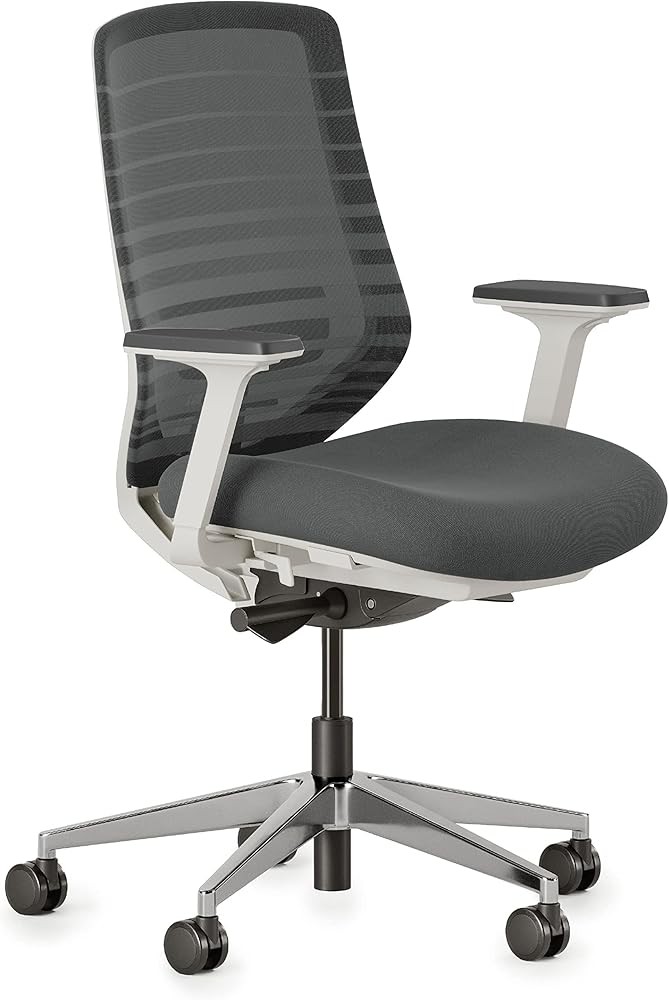
Branch Ergonomic Chair
Check Price on AmazonAs an Amazon Associate we earn from qualifying purchases.
Forward seat tilt option draws from research demonstrating reduced hip flexion during sitting can decrease lumbar muscle activation required to maintain posture (O’Sullivan et al., 2012). The study using surface EMG measurements found forward-inclined dynamic chairs reduced lumbar multifidus activation (p=0.013) compared to standard office chairs. This feature may particularly benefit users who experience fatigue during prolonged upright sitting postures.
BIFMA (Business and Institutional Furniture Manufacturers Association) testing validates structural integrity and basic ergonomic functionality, providing independent verification of design claims. The 100kg weight capacity meets standard requirements for office seating, while the 3-year warranty indicates manufacturer confidence in long-term durability.
The backrest height range of 180-230mm with recline capability supports the research-identified optimal angles for coordinated lower back and neck alignment. Clinical evidence shows backrest positioning at 110 degrees with lumbar support produces significant craniovertebral angle improvements (p<0.001) (Horton et al., 2010). The Branch chair’s adjustment capabilities encompass this validated positioning.
Medical-grade support designation suggests design attention to clinical ergonomic principles, though this term lacks standardized definition across the furniture industry. The chair addresses multiple research-identified factors: adjustable lumbar positioning in three dimensions, forward seat tilt option for reduced hip flexion, and backrest angles supporting cervical alignment through the postural support chain.
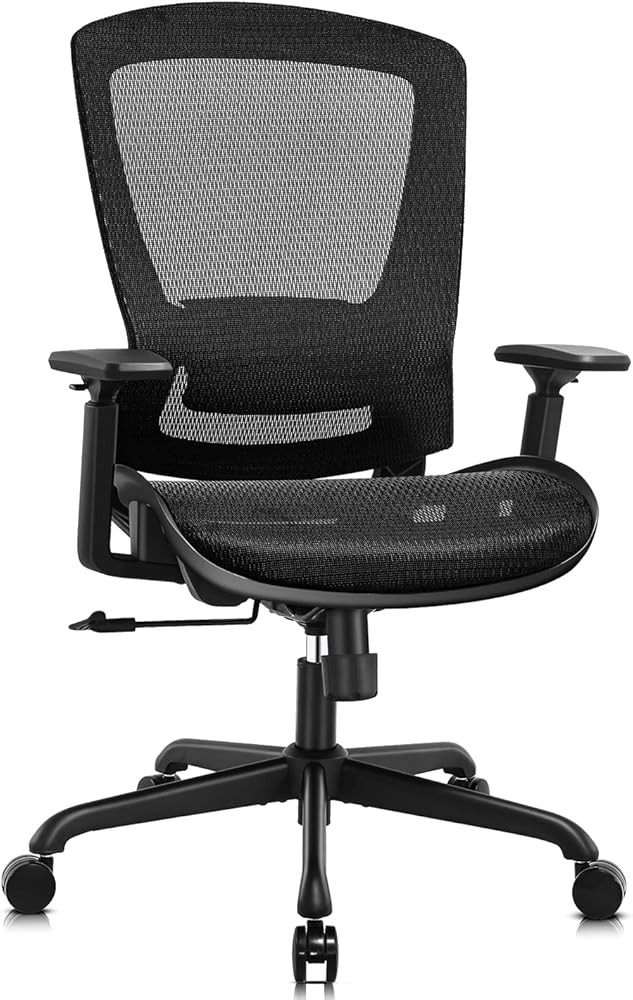
ELABEST Mesh Office Chair
Check Price on AmazonAs an Amazon Associate we earn from qualifying purchases.
Mesh backrest design promotes air circulation, potentially addressing the discomfort from heat accumulation during prolonged sitting. While research on ergonomic seating primarily focuses on biomechanical factors like lumbar positioning and pelvic alignment, thermal comfort influences overall sitting tolerance. The breathable construction may benefit users in warmer environments or those experiencing perspiration issues with solid upholstered backrests.
The 110kg weight capacity falls between budget models (typically 90kg) and premium options (120kg), accommodating a substantial user range. Research shows users with higher BMI prefer elevated lumbar support positioning (Coleman et al., 1998), and the 170-220mm height range extends sufficiently to address this preference pattern while the weight capacity supports the user population requiring those settings.
Fixed seat angle eliminates the synchronized tilt mechanisms present in premium models, sacrificing the research-demonstrated benefits of position variation throughout the day. Studies show backrest angle adjustment enables 6-degree lordosis variation between upright and reclined postures (Zemp et al., 2013), and radiographic research demonstrates seat pan tilt produces significant anterior pelvic rotation (p<0.0001) (De Carvalho et al., 2017). However, for users maintaining relatively static sitting positions, the fixed angle may provide adequate support at substantially reduced cost.
The 2-year warranty indicates standard coverage for mid-tier ergonomic seating. At $225, the chair provides essential research-validated lumbar adjustment capabilities—height and depth positioning—at approximately 40% less than premium models offering additional adjustment dimensions that may provide incremental rather than transformational benefits for many users.
The Basic Ergonomic Office Chair provides single-dimension lumbar height adjustment at fixed 185mm positioning with 380mm depth. While eliminating the broad customization ranges present in premium models, the fixed specifications approximate the research-documented mean preferred positions of 190mm height and 387mm depth from seat front (Coleman et al., 1998). This standardized approach may suit users with average anthropometric measurements who align closely with the clinical mean values.
The fixed 185mm height falls 5mm below the 190mm research-validated mean, a relatively minor deviation that likely falls within acceptable tolerance for most users. However, clinical studies demonstrate preferred settings extending to both extremes of adjustment ranges, indicating substantial individual variation (Coleman et al., 1998). Users falling outside the average range—particularly those with higher BMI who research shows prefer elevated lumbar positioning, or individuals experiencing active back pain who consistently position support closer to seat front—may find fixed specifications inadequate.
The 380mm fixed depth closely matches the 387mm mean optimal distance documented in clinical research. Depth adjustment particularly benefits users experiencing back pain, as these individuals significantly prefer closer lumbar contact (Coleman et al., 1998). The Basic chair’s inability to accommodate this preference represents a meaningful limitation for the specific population most likely seeking ergonomic seating solutions.
Fixed seat angle and non-adjustable backrest eliminate the synchronized tilt mechanisms and recline capabilities shown in research to reduce static loading through position variation. Studies demonstrate regular backrest angle changes enable 6-degree lordosis variation (Zemp et al., 2013), and radiographic evidence shows seat pan tilt produces significant anterior pelvic rotation (p<0.0001) (De Carvalho et al., 2017). Users maintaining static positions throughout work periods miss these research-demonstrated benefits.
The 90kg weight capacity restricts user range compared to standard 100-110kg limits in mid-tier models and 120kg in premium options. The 1-year warranty provides minimal coverage, suggesting less manufacturer confidence in long-term durability than the 2-5 year warranties typical of higher-tier ergonomic seating. At $199, the chair represents minimum investment in research-based lumbar positioning, suited for users with average measurements and limited budgets accepting trade-offs in adjustability and capacity.
How Should You Position an Ergonomic Chair for Maximum Benefit?
Proper chair adjustment requires systematic configuration of multiple parameters in sequence to achieve research-validated positioning. Begin with seat height adjustment, positioning the seat so feet rest flat on the floor with thighs parallel to ground and knees at approximately 90-degree angles. Research in Ergonomics demonstrates pelvic positioning as foundational to lumbar alignment (De Carvalho et al., 2017), and seat height directly influences pelvic tilt. Insufficient seat height causes posterior pelvic rotation contributing to lumbar flexion, while excessive height reduces foot contact and stability.
Adjust seat depth to provide 2-4 finger width clearance between the back of knees and seat front edge. This positioning avoids pressure on the popliteal region that can impair circulation while ensuring sufficient seat pan support for thigh distribution of body weight. The research-documented mean lumbar depth of 387mm from seat front (Coleman et al., 1998) assumes appropriate seat depth positioning that varies based on individual leg length.
Configure lumbar support height to contact the lower back at the belt line level, approximately at the L3-L4 vertebral level. Clinical studies document mean preferred height of 190mm above compressed seat surface (Coleman et al., 1998), though individual variation extends to both extremes of adjustment ranges. Users experiencing active back pain should note research shows this population consistently positions support closer to seat front, suggesting depth adjustment toward the 350mm minimum rather than the 387mm mean may provide greater relief.
Adjust lumbar depth to maintain light contact with the lower back throughout the work period. Research demonstrates depth as the second critical adjustment parameter after height (Coleman et al., 1998), and radiographic evidence shows proper lumbar positioning produces significant anterior pelvic rotation (p=0.0028) reducing excessive spine flexion (De Carvalho et al., 2017). Insufficient depth allows slumped postures to develop, while excessive depth can create uncomfortable pressure forcing users to shift forward and lose support contact entirely.
For chairs offering lumbar angle or firmness adjustments, configure these parameters after establishing optimal height and depth. Angle adjustments should create even contact distribution across the lumbar region without pressure concentration at any single point. Firmness should provide sufficient support resistance to maintain posture while allowing comfort during sustained contact. Research shows older users more sensitive to lumbar positioning accuracy (Coleman et al., 1998), suggesting this population may require more attention to these fine-tuning parameters.
Set backrest height so the lumbar support contacts the lower back as configured while the upper backrest supports the thoracic spine without creating shoulder impingement. Studies document backrest angle significantly influences head and neck posture through the postural support chain (Horton et al., 2010). The research-validated 110-degree backrest position with proper lumbar support produces significant craniovertebral angle improvements (2.32 degrees, 95% CI: 1.31-3.33; p<0.001), promoting neutral neck alignment.
Configure seat pan tilt if available to promote slight anterior pelvic rotation. Radiographic research demonstrates seat pan tilt produces stronger anterior rotation effects (p<0.0001) than lumbar support alone (p=0.0028) (De Carvalho et al., 2017). However, excessive tilt can cause sliding forward from the seat, so adjust incrementally to find the angle providing postural benefit without compromising seated stability.
Adjust synchronized tilt tension to allow recline with moderate resistance, preventing unexpected backward movement while enabling position changes throughout the day. Research using upright MRI demonstrates backrest angle adjustment enables 6-degree lordosis variation between upright and reclined positions (Zemp et al., 2013), and biomechanical evidence shows synchronized mechanisms that tilt seat posterior during backrest recline maintain optimal segmental angles (Lengsfeld et al., 2000). Regular position changes reduce static loading that contributes to tissue stress.
Set armrest height so forearms rest comfortably with shoulders relaxed and elbows at approximately 90 degrees. Armrests positioned too high force shoulder elevation contributing to neck and upper trapezius tension, while excessively low armrests provide insufficient support causing users to lean sideways. Proper armrest positioning reduces upper body loading that can indirectly affect lower back stress through postural compensation patterns.
Test the complete configuration by sitting for 10-15 minutes while performing typical work tasks, then make incremental adjustments to address any pressure points or postural discomfort. Research demonstrates substantial individual variation in optimal settings (Coleman et al., 1998), and the documented wide range of preferred positions emphasizes that published mean values provide starting points requiring personalization. Users should expect to fine-tune adjustments over several days as they adapt to the new sitting position and identify areas requiring modification.
What Behavioral Strategies Complement Ergonomic Seating?
Research consistently demonstrates that while evidence-based chair features reduce biomechanical stress factors, they do not eliminate sitting-related pain risk when used in isolation. The radiographic study measuring spinal alignment across four chair configurations found sitting involves approximately 70% of maximum spine flexion range regardless of specific features tested (De Carvalho et al., 2017). This end-range positioning increases stress to spinal structures even with optimal lumbar support and seat pan tilt, emphasizing the importance of behavioral interventions complementing equipment solutions.
Regular position changes throughout the work period reduce static loading on spinal tissues. Research in BioMed Research International using upright MRI demonstrates backrest angle adjustment enables 6-degree lordosis variation between upright and reclined postures (Zemp et al., 2013). Users should utilize available recline capabilities to shift spinal loading patterns every 30-60 minutes, alternating between more upright and moderately reclined positions rather than maintaining single static angles for hours.
Scheduled movement breaks interrupt prolonged sitting exposures associated with tissue stress accumulation. The cross-sectional study of 528 office workers identified sitting at desks for extended periods without breaks as a significant risk factor for musculoskeletal pain (p<0.05) (Celik et al., 2018). Evidence supports brief breaks of 2-3 minutes every 30 minutes, during which users stand, walk, and perform basic stretches to reverse sustained postures and promote circulation.
Workstation configuration beyond chair selection influences postural demands. Monitor positioning at eye level approximately arm’s length distance reduces neck flexion documented as a risk factor in ergonomic research . Keyboard and mouse placement allowing forearm support with shoulders relaxed minimizes upper body tension that can contribute to postural compensation affecting the entire spine. Research shows ergonomic factors work synergistically rather than independently.
Exercise programs targeting trunk musculature may enhance sitting tolerance. A review of occupational hazards in medical specialties noted that early institution of correct ergonomic training combined with exercises appears feasible and potentially effective for musculoskeletal disorder risk reduction . While specific exercise prescriptions exceed the scope of equipment-focused guidance, consultation with physical therapists or occupational health specialists can provide individualized programming addressing identified weaknesses or imbalances.
Flexibility training may influence seated posture capability. Research in Journal of Biomechanics found greater pelvic flexibility associated with more upright lumbar sitting posture (p=0.023; η2=0.132) (Frey et al., 2019). While the study did not test whether flexibility interventions improve sitting posture, the documented relationship suggests that addressing mobility limitations through appropriate stretching programs could potentially enhance ability to utilize ergonomic chair features effectively.
Body weight management relates to optimal chair configuration. Research demonstrates users with higher BMI prefer elevated lumbar support positioning (Coleman et al., 1998), and weight capacity limitations restrict chair options for some individuals. Maintaining healthy body weight through balanced nutrition and regular physical activity provides broader equipment compatibility and may reduce biomechanical stress during sitting through improved postural control and reduced loading forces.
Stress management influences musculoskeletal pain perception. The cross-sectional study of office workers found moderate or extremely stressful workplace environments associated with increased musculoskeletal system pain (p<0.05) (Celik et al., 2018). While ergonomic interventions address biomechanical factors, psychological stress can amplify pain experiences and influence postural habits through mechanisms including increased muscle tension and reduced awareness of positioning.
Self-monitoring and adjustment behavior optimization represent often-overlooked factors in ergonomic effectiveness. Research shows older workers more likely to readjust lumbar support from disrupted positions than younger workers (Coleman et al., 1998), suggesting younger users may benefit from explicit training about the importance of maintaining configured settings. Users should develop habits of checking and correcting chair positioning at the start of each work period and after colleagues or family members use the same workstation.
Education about research-based expectations helps users form realistic assessments of ergonomic interventions. Studies show that even with optimal chair features, 39% of tested participants developed significant sitting-induced pain (De Carvalho & Callaghan, 2023). Users should understand ergonomic seating reduces but does not eliminate risk, and persistence of some discomfort despite proper equipment may indicate need for additional interventions including workstation layout modification, schedule adjustments allowing more frequent position changes, or clinical evaluation for underlying musculoskeletal conditions requiring specific management.
Are There Situations Where Ergonomic Chairs May Not Provide Expected Benefits?
Clinical evidence demonstrates that individual response to ergonomic interventions varies substantially, with some users experiencing minimal benefit despite proper equipment and configuration. Research in Ergonomics analyzing 31 adults found 39% classified as pain developers who experienced significantly higher peak pain levels across most body regions despite using chairs with research-validated features (De Carvalho & Callaghan, 2023). The study noted non-pain developers displayed lower spine muscle activation levels overall, suggesting underlying neuromuscular differences may influence sitting tolerance independent of chair design.
The research concluded that sitting-induced pain was present in the study sample at similar proportions to those reported previously, despite improvements in spine posture from lumbar support and seat pan tilt features. This finding led researchers to suggest future interventions may need targeting specifically to sitting-induced pain developers rather than general populations, as standard ergonomic features may not address the underlying factors making certain individuals more susceptible to sitting-related discomfort.
Pre-existing spinal conditions may limit ergonomic chair effectiveness. The multicenter randomized controlled trial of 280 office workers with lumbar pain showed high variability in pain outcomes measured via Oswestry Disability Index despite controlled chair interventions (Lengsfeld et al., 2007). While the study demonstrated that high-quality ergonomic chairs provide benefits across populations, individual pain experiences involve complex factors including disc pathology, facet joint arthritis, muscle imbalances, and neural sensitization that equipment modifications alone cannot fully address.
Psychological factors influence pain perception and sitting tolerance. Research identifying stressful workplace environments as associated with increased musculoskeletal pain (p<0.05) (Celik et al., 2018) demonstrates that biomechanical interventions represent only one component of comprehensive pain management. Users experiencing significant psychosocial stress, job dissatisfaction, or workplace conflicts may report persistent pain despite optimal ergonomic equipment due to the complex interaction between psychological states and pain neurobiology.
Anatomical variations may limit ability to achieve research-validated positioning. Studies document substantial individual differences in pelvic flexibility (Frey et al., 2019) and preferred lumbar support settings extending to both extremes of adjustment ranges (Coleman et al., 1998). Users with anatomical characteristics falling outside the population ranges tested in research studies may find even highly adjustable chairs cannot accommodate their specific needs. Examples include individuals with significant leg length discrepancies, severe scoliosis, or other structural variations requiring specialized seating solutions.
Inadequate workstation configuration beyond the chair itself undermines ergonomic benefits. Research emphasizes that multiple workplace factors contribute synergistically to musculoskeletal health (Celik et al., 2018). Users may configure chairs optimally but maintain problematic monitor heights requiring sustained neck flexion, keyboard positions necessitating awkward arm postures, or inadequate lighting causing forward head positioning to see screen content. Ergonomic interventions require comprehensive workplace assessment rather than isolated equipment changes.
Insufficient adjustment and maintenance behaviors reduce long-term effectiveness. Studies show age-related differences in readjustment behavior (Coleman et al., 1998), and younger users may not maintain configured settings as consistently. Chair mechanisms can also shift over time due to regular use, gradually moving away from optimal positions without users recognizing the subtle changes. Regular reassessment and periodic reconfiguration help maintain the biomechanical benefits documented in controlled research studies.
Unrealistic expectations about pain elimination versus risk reduction can lead users to judge effective interventions as failures. Research demonstrates that even optimal chair features still involve approximately 70% of maximum spine flexion during sitting (De Carvalho et al., 2017), and some degree of discomfort during prolonged sitting may persist despite proper equipment. Users expecting complete pain resolution may abandon ergonomic interventions that are actually providing meaningful risk reduction but not achieving unrealistic comfort goals.
Medical conditions requiring clinical management may present as sitting-related pain. Users attributing discomfort solely to workplace ergonomics may overlook conditions including inflammatory arthritis, infection, tumors, or referred pain from visceral sources that require medical evaluation and specific treatment. Persistent or progressive pain despite optimal ergonomic interventions warrants clinical assessment to exclude underlying pathology requiring interventions beyond workplace equipment modifications.
These factors do not invalidate the substantial research evidence supporting ergonomic chair features for reducing sitting-related back pain risk across populations. Rather, they emphasize that individual circumstances vary, and users experiencing persistent significant pain despite proper equipment should consider additional interventions including workstation layout assessment, behavioral modifications, exercise programs, stress management, and when appropriate, clinical evaluation to address factors beyond the scope of equipment-based solutions.
How Do You Maintain Ergonomic Chairs for Long-Term Performance?
Regular maintenance preserves the adjustment capabilities and structural integrity that enable chairs to provide research-validated biomechanical benefits over extended periods. Adjustment mechanisms require periodic lubrication to maintain smooth operation, particularly height adjustment cylinders, tilt tension controls, and lumbar positioning screws. Research emphasizes the importance of users being able to easily adjust and readjust positioning (Coleman et al., 1998), and stiff or sticky mechanisms that require excessive force discourage the regular fine-tuning behaviors associated with optimal outcomes.
Inspect pneumatic cylinders monthly for signs of fluid leakage or reduced lift capacity. Height adjustment cylinders that slowly sink under load or fail to hold configured positions compromise the seat height specification foundational to proper pelvic positioning. Research demonstrates seat height directly influences pelvic tilt (De Carvalho et al., 2017), and cylinders losing pressure can gradually shift users away from optimal positioning without obvious failure symptoms. Replacement cylinders for most chair models cost $30-60 and restore proper height adjustment functionality.
Check tightness of all fasteners quarterly, as vibration and regular movement can gradually loosen bolts and screws connecting components. Loose armrests shift during use, disrupting the configured height that maintains proper shoulder positioning. Unsecured backrests can tilt or rotate, moving away from the research-validated angles shown to influence both lumbar alignment and cervical posture (Horton et al., 2010). A basic hex key set enables users to perform this maintenance without professional service.
Clean mesh surfaces and upholstery regularly to avoid accumulation of skin oils, dust, and debris that can degrade materials and create uncomfortable contact surfaces. Mesh backrests provide air circulation benefits but can accumulate particles in the weave that reduce breathability. Use vacuum attachments for mesh surfaces and manufacturer-recommended cleaning solutions for upholstered components. Avoid harsh solvents that may damage foam padding or fabric finishes.
Verify lumbar support positioning periodically, as some adjustment mechanisms can shift with repeated use. Research shows users experiencing back pain consistently position support closer to seat front (Coleman et al., 1998), and gradual mechanism creep away from this configured setting can reintroduce symptoms. Users should mark optimal positions or record specific measurement values to enable verification that settings remain stable over weeks and months of use.
Test synchronized tilt mechanisms monthly to ensure smooth coordinated movement without binding or irregular resistance. Biomechanical research demonstrates the importance of synchronized seat-backrest movement for maintaining optimal segmental angles during recline (Lengsfeld et al., 2000). Mechanisms that bind or catch during operation eliminate the position variation shown to enable beneficial lordosis changes throughout the day (Zemp et al., 2013). Many tilt mechanisms include adjustment screws allowing tension calibration if resistance becomes excessive.
Inspect casters for debris accumulation and damage that impairs rolling. Accumulated hair, thread, and carpet fibers can bind caster mechanisms, increasing the force required to move the chair and potentially causing users to brace awkwardly during repositioning. This bracing can generate spinal loading that undermines the benefits of properly configured seating. Remove debris monthly and replace damaged casters to maintain easy mobility.
Assess armrest padding for compression and wear, as degraded padding concentrates pressure on smaller contact areas. While armrests primarily influence upper body positioning, improper arm support can cause postural compensations affecting lumbar alignment. Replace worn armrest pads to maintain the distributed contact supporting research-based positioning with shoulders relaxed and elbows at 90 degrees.
Monitor weight capacity compliance, particularly in environments where multiple users share chairs. Exceeding manufacturer-specified weight limits accelerates wear on structural components and adjustment mechanisms, potentially leading to sudden failures that can cause injury. The research-documented relationship between higher BMI and preferred elevated lumbar positioning (Coleman et al., 1998) emphasizes that chairs must maintain adjustment capabilities across the full weight capacity range.
Replace chairs when cumulative wear compromises adjustment capabilities or structural integrity beyond economical repair. Most ergonomic office chairs provide 5-10 years of service with proper maintenance, though intensive use in 24-hour operations or industrial environments may reduce this lifespan. Signs indicating replacement need include: adjustment mechanisms that no longer hold configured positions, visible structural damage to seat pan or backrest frames, compressed foam padding that no longer provides adequate cushioning, or torn upholstery exposing internal materials.
Budget for replacement before catastrophic failure occurs, as sudden chair failures often result in users tolerating inadequate temporary seating while replacement procurement processes complete. Research shows that sitting in chairs lacking proper lumbar support significantly increases back pain risk (Celik et al., 2018), and even brief periods with substandard seating can trigger pain episodes requiring extended recovery. Planned replacement based on condition assessment avoids these scenarios.
What Does Evidence Show About Standing Desks as Alternatives to Ergonomic Seating?
Research on standing desk interventions examines whether reducing total sitting time addresses the approximately 70% spine flexion characteristic of prolonged seated work (De Carvalho et al., 2017). Systematic reviews of standing desk studies show mixed results, with some participants reporting reduced low back pain while others experience increased lower extremity discomfort or fatigue without significant pain changes. The heterogeneity in outcomes suggests individual factors influence whether standing alternatives provide net benefit.
Studies comparing prolonged standing to prolonged sitting generally find both static postures problematic, with optimal approaches involving regular alternation between positions. Research on musculoskeletal disorders emphasizes that static postures—whether sitting or standing—create sustained loading on tissues that can generate discomfort and injury risk. Height-adjustable sit-stand workstations enable position variation, though evidence on optimal transition frequencies and durations remains limited.
Some users find alternating between properly configured ergonomic seating and standing positions throughout the day provides superior outcomes to either position alone. This approach addresses the research finding that sitting involves substantial spine flexion (De Carvalho et al., 2017) by periodically unloading spinal structures through standing, while preventing the lower extremity fatigue and potential venous pooling associated with prolonged standing. Transition frequencies of 30-60 minutes align with recommendations for movement breaks from static sitting.
However, standing introduces different biomechanical demands that may not suit all users. Individuals with lower extremity conditions including plantar fasciitis, Achilles tendinopathy, knee arthritis, or venous insufficiency may experience symptom exacerbation from prolonged standing. Similarly, users with balance disorders or orthostatic hypotension may find standing work positions unsuitable. The individual variation in response to standing alternatives parallels the variation in ergonomic seating effectiveness documented in research (De Carvalho & Callaghan, 2023).
For users considering standing desk options, evidence suggests viewing them as complementary to rather than replacement for properly configured ergonomic seating. Research demonstrates specific chair features provide measurable biomechanical benefits (PMID: 27915585, PMID: 11259935), and completely eliminating sitting removes the opportunity to utilize these research-validated interventions. Height-adjustable workstations enabling regular position changes between optimized sitting and standing configurations may provide advantages over either static approach.
What Related Ergonomic Equipment Supports Comprehensive Workplace Setup?
Comprehensive ergonomic workstation configuration extends beyond seating to address the interconnected postural demands of desk work. Research demonstrates that multiple workplace factors contribute synergistically to musculoskeletal health (Celik et al., 2018), with variables including monitor positioning, keyboard placement, and work surface height influencing spinal loading patterns.
Monitor arms or stands enable proper screen positioning at eye level approximately arm’s length distance, reducing the neck flexion identified as a risk factor for cervical pain in occupational research . Studies show head and neck posture influences lumbar positioning through the postural support chain (Horton et al., 2010), emphasizing that upper body positioning affects lower back stress. Adjustable monitor support allows customization for individual user height and vision characteristics.
Keyboard trays or negative-tilt platforms position input devices to allow forearm support with shoulders relaxed and elbows at approximately 90 degrees. Research shows working with both forearms elevated above desk level associates with increased musculoskeletal pain (p<0.05) (Celik et al., 2018). Proper keyboard positioning enables the neutral arm posture that reduces upper body tension and reduces risk of postural compensations affecting spinal alignment.
Footrests benefit shorter users who cannot achieve simultaneous flat foot contact and proper seat height for 90-degree knee angles. Research demonstrates seat height influences pelvic positioning foundational to lumbar alignment (De Carvalho et al., 2017), and users choosing between optimal pelvic position versus foot contact often compromise one parameter. Adjustable footrests resolve this conflict by providing stable foot support at the height required when seat positioning prioritizes pelvic alignment.
Document holders position reference materials at similar height and distance as the computer monitor, reducing repetitive neck rotation and flexion when alternating between screen and paper documents. The cross-sectional study identifying sustained postures as risk factors for musculoskeletal pain (Celik et al., 2018) suggests minimizing asymmetrical positioning and repetitive movements through proper accessory placement.
Task lighting supplements ambient illumination to ensure adequate visibility of work materials without requiring postural adjustments for visual clarity. Forward head posture to see dim screens or documents creates the sustained neck flexion documented as problematic in ergonomic research . Adjustable task lights positioned to minimize screen glare enable neutral head and neck positioning for visual tasks.
Anti-fatigue mats provide cushioned standing surfaces for users incorporating standing intervals into their work routine. While research on ergonomic seating addresses sitting-related factors, users alternating between sitting and standing positions require appropriate equipment for both postures. Anti-fatigue mats reduce lower extremity discomfort during standing periods, though they do not eliminate the biomechanical loading that makes prolonged standing problematic.
Lumbar support pillows offer portable alternatives for users who work in multiple locations or use vehicles extensively. While adjustable chair-integrated lumbar support provides optimal functionality based on research specifications (Coleman et al., 1998), portable pillows enable some degree of positioning control in settings with fixed seating. Users should select pillows with adjustable straps and sufficient firmness to maintain positioning under body weight.
Best Standing Desks provide height-adjustable work surfaces enabling position variation throughout the day, complementing ergonomic seating by allowing periodic standing intervals. Best Lumbar Support Pillows offer portable positioning solutions for users working in multiple locations. Best Heating Pads may provide symptomatic relief for users experiencing back discomfort despite optimal ergonomic configuration. Best Acupressure Mats and Best TENS Units represent additional tools some users find helpful for managing sitting-related discomfort as part of comprehensive approaches.
Related Reading
Recommended Products